
Download Stammer – AI Solutions for Agencies, Automation, White‑Label Tool
Introduction
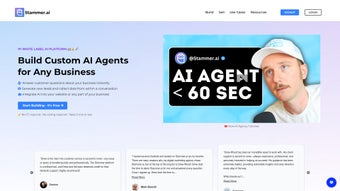
In today’s hyper‑competitive digital landscape, agencies are under constant pressure to deliver faster, smarter, and more personalized solutions for their clients. Artificial intelligence has become the cornerstone of that transformation, yet many agencies still struggle with the technical and financial hurdles of building their own AI pipelines. Stammer.ai arrives as a purpose‑built, white‑label platform that eliminates the need for deep‑tech expertise while giving agencies full control over branding, pricing, and data governance. Whether you run a boutique creative shop or a mid‑size consultancy, Stammer provides a secure, cloud‑native environment where you can spin up custom models, automate repetitive tasks, and generate revenue‑grade content with just a few clicks. This review explores how Stammer’s architecture, feature set, and pricing model align with the real‑world needs of modern agencies, and why it might be the missing piece in your service catalog.
Key benefits highlighted in this guide include zero‑code model creation, comprehensive white‑label capabilities, and a robust automation engine that integrates seamlessly with the tools agencies already love—CRM systems, project‑management platforms, and content management solutions. We’ll also address common concerns around data privacy, scalability, and support, offering a balanced view to help you decide if Stammer is the right AI partner for your business.
Overview and Core Features
Stammer.ai is a subscription‑based SaaS solution tailored specifically for marketing, creative, and technology agencies that want to embed AI without the overhead of hiring data scientists or maintaining expensive infrastructure. The platform delivers a fully white‑label environment where agencies can customize the UI, API endpoints, and even the domain name, presenting AI services as if they were built in‑house. By handling data preparation, model training, and cloud scaling behind the scenes, Stammer frees agencies to focus on strategic consulting, client relationship management, and revenue generation.
Below is a detailed feature list that illustrates how Stammer turns complex AI workflows into intuitive, business‑friendly processes. Each item is designed to address a specific pain point commonly encountered by agencies looking to adopt AI at scale.
- White‑Label Branding: Full UI and API customization lets you showcase AI services under your own logo, colors, and domain.
- Model Builder Studio: Drag‑and‑drop interface for training proprietary models using client data—no coding required.
- Pre‑Built AI Templates: Ready‑to‑use solutions for chatbots, content generation, sentiment analysis, and predictive analytics.
- Automation Engine: Visual workflow editor to schedule tasks, trigger actions via API calls, and integrate with tools like Asana, Trello, or Monday.com.
- Analytics Dashboard: Real‑time usage statistics, cost tracking, and performance metrics that can be shared with clients to demonstrate ROI.
- Secure Multi‑Tenant Architecture: Data isolation, GDPR‑compliant storage, and role‑based access control ensure client data remains protected.
- Scalable Cloud Hosting: Automatic scaling across AWS, Azure, or Google Cloud to handle traffic spikes without manual intervention.
- API & Webhook Support: RESTful endpoints and webhook notifications enable seamless integration with existing tech stacks.
- Continuous Updates: Monthly feature releases and security patches delivered without downtime.
- Multi‑Language Support: UI and AI models can be localized to over 30 languages, expanding global reach.
Beyond the checklist, Stammer’s architecture is built for extensibility. You can add custom scripts, integrate third‑party ML libraries, or connect to on‑premise data warehouses via secure VPN tunnels. This flexibility makes the platform suitable for a wide range of use cases—from generating SEO‑friendly copy for e‑commerce sites to powering predictive sales models for financial services firms.
Installation, Setup, and Daily Use
Because Stammer is a cloud‑native SaaS platform, there is no traditional software installation required on local machines. Agencies start by creating an account on the Stammer website, selecting a subscription tier that aligns with expected usage, and completing a quick KYC verification to ensure compliance. Once the account is active, an onboarding wizard guides you through a structured, step‑by‑step process:
- Domain White‑Labeling: Upload your agency’s logo, choose brand colors, and map a custom sub‑domain (e.g., ai.youragency.com) to the Stammer portal.
- Team Configuration: Invite team members, assign roles (Admin, Modeler, Analyst), and set permission levels for data access.
- Data Connectors: Link existing CRM, CMS, or data warehouses via built‑in connectors or custom API keys. Stammer supports CSV upload, Google Sheets, and direct database connections.
- Model Creation: Use the Model Builder Studio to select a template (e.g., “Content Generation”), upload sample data, and let the system auto‑train a model in minutes. Advanced users can fine‑tune hyper‑parameters through a simple UI.
- Workflow Automation: Define triggers (e.g., new lead captured) and actions (e.g., generate personalized email copy) using the visual workflow editor.
- Testing & Deployment: Run sandbox tests with dummy data, review output quality, and push the workflow live for client consumption.
Once set up, daily operations revolve around the centralized dashboard. Here you can monitor model performance, adjust pricing tiers for client consumption, generate usage reports, and even approve content on the go from tablets or smartphones thanks to the responsive design. For agencies that require tighter data control, Stammer offers an optional hybrid deployment that mirrors the SaaS functionality while keeping data behind a private firewall.
Stammer is browser‑based and works seamlessly on Windows 10/11, macOS Monterey and later, modern Linux distributions, as well as iOS and Android devices via the responsive web app.
Conclusion, Pros & Cons, Frequently Asked Questions, and Call to Action
Stammer.ai fills a critical gap for agencies that want to stay ahead of the AI curve without the heavy lift of building and maintaining their own machine‑learning pipelines. Its blend of white‑label branding, no‑code model creation, and robust automation tools empowers agencies to expand their service catalog, increase billable hours, and deliver measurable value to clients across industries.
Pros
- Zero‑code AI model creation—perfect for agencies without data‑science teams.
- Full white‑label capability preserves agency branding and client trust.
- Scalable cloud infrastructure eliminates the need for hardware investments.
- Extensive library of pre‑built templates speeds time‑to‑market.
- Transparent pricing and usage analytics help agencies demonstrate ROI.
Cons
- Subscription cost may be prohibitive for very small boutique agencies.
- Learning curve for advanced workflow automation can be steep.
- Limited offline functionality—requires a constant internet connection.
FAQ
Can I use Stammer with my existing CRM?
Yes. Stammer includes native connectors for Salesforce, HubSpot, Zoho, and a generic API option for any CRM that supports RESTful calls.
Is there a free trial available?
Stammer offers a 14‑day free trial with access to all core features, allowing agencies to prototype a project before committing to a paid plan.
How does Stammer handle data privacy?
All data is encrypted at rest and in transit. The platform complies with GDPR, CCPA, and ISO 27001 standards, and offers data residency options in the EU, US, and APAC regions.
Can I resell AI services to my clients?
Absolutely. The white‑label license allows agencies to package, price, and invoice AI outputs as part of their own service contracts.
What support options are available?
Stammer provides 24/7 email support, a dedicated account manager for enterprise tiers, and a community forum with tutorials, webinars, and API documentation.
If you’re ready to transform your agency into an AI‑enabled powerhouse, sign up for the free trial today and experience the future of automated client solutions.



.png)



